API Connections
API Connections in Beeceptor make it easy to connect with external APIs that require OAuth 2.0 authentication. You can securely store OAuth credentials and token endpoints in Beeceptor and reuse them whenever Beeceptor sends outbound requests.
When a HTTP Callout rule triggers a request to an external service, Beeceptor automatically generates an access token and attaches it to the outgoing request. This means you do not need to manually create or paste tokens in your rules.
Creating an API Connection
Creating an API Connection
- Open Account → API Connections
- Click Add Connection
- Provide the following details:
- Display Name - A friendly name used to identify the connection.
- Shared Endpoints - Select which endpoints can use this connection. Only those endpoints will see the connection in the Authentication Method dropdown when configuring rules.
- OAuth Token URL - The token endpoint provided by the API provider.
- Client ID / Client Secret
- Header Prefix (default: Bearer) - Fill this, if the
Authorizationheader's prefix is something other thanBearer - Additional Parameters (optional) - These are addtional key-value pairs sent in the token request body (e.g.
scope=read write).
- Click Create.
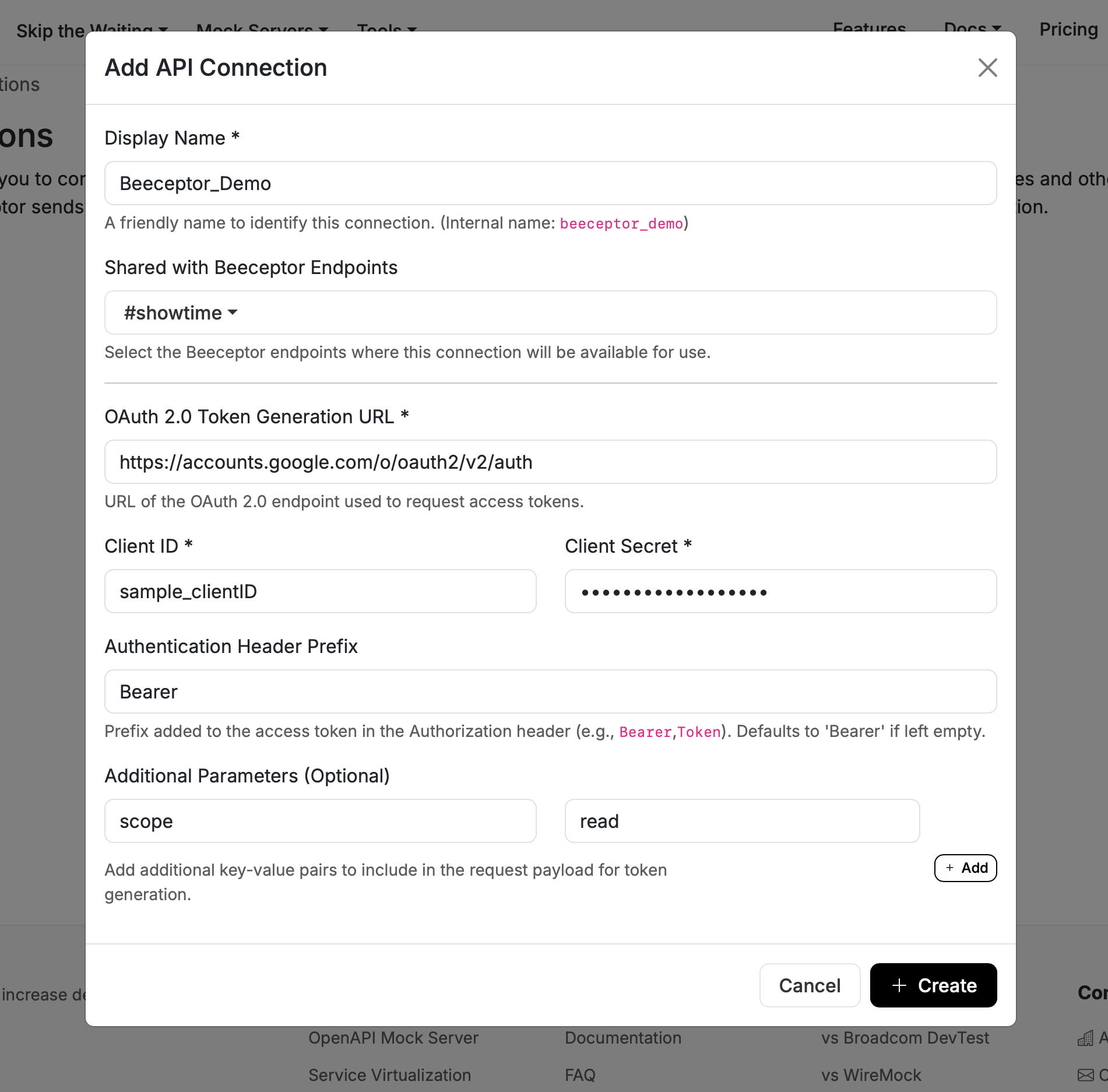
Beeceptor immediately performs a token request to verify the configuration. The result will indicate:
- Success if the token is retrieved.
- Failure if the endpoint or credentials are incorrect. Even if the token test fails, the connection is still created and can be updated later.
When editing the connection, leave the Client Secret field empty if you want to keep the existing secret unchanged.
Usage in Callout Rules
In a HTTP Callout mock rule, you should select an API Connection under Authentication Method. Beeceptor will obtain a token and include it in the request to the target API.
When creating or editing a rule that sends an outbound request:
- Create a new Callout Rule.
- In the Asynchronous Request Configuration section, find Authentication Method.
- Use the Add link (opens API Connections in a new tab) if you need to create a new connection.
- In the Authentication Method dropdown, select the API Connection you want. Options are limited to connections shared with the current endpoint.
- Save the rule.
If you recently created or edited a connection in another tab, use the Refresh (↻) button next to the dropdown to reload the list.
When the rule executes, Beeceptor retrieves a token using the selected connection and automatically adds it to the outbound request header, for example:
Authorization: Bearer <token>
API Connections are stored at the account level and can be shared across multiple Beeceptor endpoints.