Locale for Test Data
Beeceptor supports localization when generating test data in the mock responses. You can set a preferred locale for an endpoint and Beeceptor will use that locale to produce names, addresses, phone numbers, dates, and other synthetic test data. This helps you generate realistic API responses that match a target region, language, or country for your a great demo or showcase.
Configuring Locale
You can configure the locale from the Settings page of your endpoint.
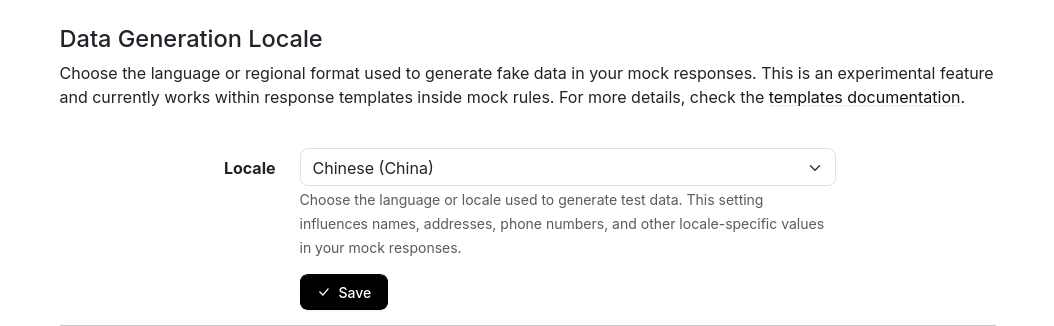
Once saved, Beeceptor applies the selected locale to all test data helpers inside your templates. You can update this setting anytime. When the locale is changed, all new requests begin using region-specific data instantly.
Localization Example
Below is asample templates and corrosponding response when Chinese (China) is selected. You can replace them with your actual response structures.
Template
{
  "firstName": "{{faker 'person.firstName'}}",
  "lastName": "{{faker 'person.lastName'}}",
  "fullName": "{{faker 'person.fullName'}}",
  "street": "{{faker 'location.streetAddress'}}",
  "city": "{{faker 'location.city'}}",
  "state": "{{faker 'location.state'}}",
  "companyName": "{{faker 'company.name'}}"
}
Beeceptor Response
{
  "firstName": "浩宇",
  "lastName": "翠",
  "fullName": "蓬雨涵",
  "street": "赖侬1号",
  "city": "吉安市",
  "state": "西藏自治区",
  "companyName": "厦原市建辉水产集团有限公司"
}
Supported Locales
The following locales are currently supported in Beeceptor and can be selected from the Settings page. If you need a locale that is not listed below, please contact the support team to check if it can be added.
| Locale Code | Display Name |
|---|---|
zh_CN | Chinese (China) |
en | English (default) |
en_GB | English (Great Britain) |
en_IN | English (India) |
en_US | English (United States) |
fr | French |
id_ID | Indonesian (Indonesia) |
ja | Japanese |
pt_BR | Portuguese (Brazil) |
es | Spanish |
es_MX | Spanish (Mexico) |