Build a Stateful Shopping Cart Using Beeceptor
A real backend rarely returns the same response every time. It reads the incoming request, identifies the user, inspects the request body and past context, and builds a response from that information.
Beeceptor lets you build virtual APIs that behave the same way. Instead of returning static JSON, response templates can read request bodies, headers, query parameters, path parameters, and JWT claims. Stateful helpers can also store data between requests, making the mock behave much more like a real API.
In this tutorial, you will build the backend logic for a shopping cart application without writing a backend. The virtual API will support a complete shopping flow:
- Log in and return a JWT.
- Add products to a cart scoped to the signed-in user.
- Retrieve the user's saved cart.
- Read a root-level JSON array for a bulk operation.
- Update an item's quantity using a path parameter.
- Complete checkout and clear the cart.
The companion shopping-cart demo code will be shared in a GitHub repository and linked from this tutorial.

The demo starts with a customer login backed by a virtual API.
How the Shopping Cart Works
The storefront signs in as a customer, adds products to a cart, changes item quantities, and checks out. The website behaves like a regular shopping application; Beeceptor provides its backend behavior through virtual API rules.

A customer can browse products and manage a personalized cart.
Every cart operation reads the user_id claim from the JWT and uses it to build a state key. Two customers can call the same endpoint while their cart items remain stored in separate lists.
Before You Start
Beeceptor exposes a powerful template builder built on top of Handlebars. The quick reference below introduces the helpers used throughout the tutorial so you can recognize how each value enters a response.
| Data to read | Template |
|---|---|
| Request body field | {{body 'item.sku'}} |
| Nested body field | {{body 'shipping_address.city'}} |
| Root-array field | {{body '0.sku'}} |
| Whole request body | {{{body}}} |
| Request header | {{header 'x-client' 'unknown'}} |
| Query parameter | {{queryParam 'currency' 'USD'}} |
| Path parameter | {{pathParam 'index'}} |
| JWT claim | {{jwtPayload (header 'authorization') 'user_id'}} |
| JSON object | {{{json (body 'item')}}} |
| Stateful list | {{{json (list 'get' 'cart:u_101')}}} |
Double Braces, Triple Braces, and json
Use double braces, {{...}}, when inserting a primitive value as text. This is the common choice for a string placed inside a JSON response:
{
  "sku": "{{body 'item.sku'}}"
}
Use triple braces, {{{...}}}, when the template must insert an unescaped value. Objects and arrays must also pass through the json helper so they are serialized as valid JSON:
{
  "item": {{{json (body 'item')}}},
  "items": {{{json (list 'get' 'cart:u_101')}}}
}
This distinction matters because JSON strings, objects, and arrays have different syntax. Double braces are suitable for text. Triple braces prevent Handlebars from escaping JSON syntax, while json converts an object or array into that syntax.
Step 1 - Log In and Return a JWT
Create a POST /auth/login mocking rule and enable the templating engine. The request body contains the selected customer:
{
  "user_id": "u_101",
  "name": "Maya Wilson",
  "email": "maya@example.com"
}
Use the following response template. It reads the request fields and includes them in the JWT payload:
{
  "access_token": "eyJhbGciOiJub25lIiwidHlwIjoiSldUIn0=.{{{base64 (json (object user_id=(body 'user_id') name=(body 'name') email=(body 'email')))}}}.demo-signature",
  "token_type": "Bearer",
  "user": {
    "user_id": "{{body 'user_id'}}",
    "name": "{{body 'name'}}",
    "email": "{{body 'email'}}"
  }
}
Here, body reads primitive fields from the incoming JSON. The object helper builds the JWT payload, json serializes it, and triple braces keep the serialized value unescaped before base64 encodes it. See the jwtPayload helper reference for more ways to extract complete payloads or individual claims from incoming tokens.
Step 2 - Add a Product to the User's Cart
When the customer clicks Add to cart, the frontend sends a nested product object:
{
  "item": {
    "sku": "SKU-CHAIR-01",
    "name": "Ergo Chair",
    "quantity": 1,
    "price": 149.99,
    "fulfillment": {
      "city": "Austin",
      "warehouse": "AUS-1"
    }
  }
}
Create a POST /cart/items rule and start its response template with this stateful operation:
This line creates a user-specific cart bucket and pushes the incoming item into it:
header 'authorization'reads the bearer token.jwtPayload ... 'user_id'extracts the signed-in customer's ID.concat 'cart:' ...builds a list key such ascart:u_101.body 'item'reads the complete nested product object.list 'push'appends that object to the list stored under the user-specific key.
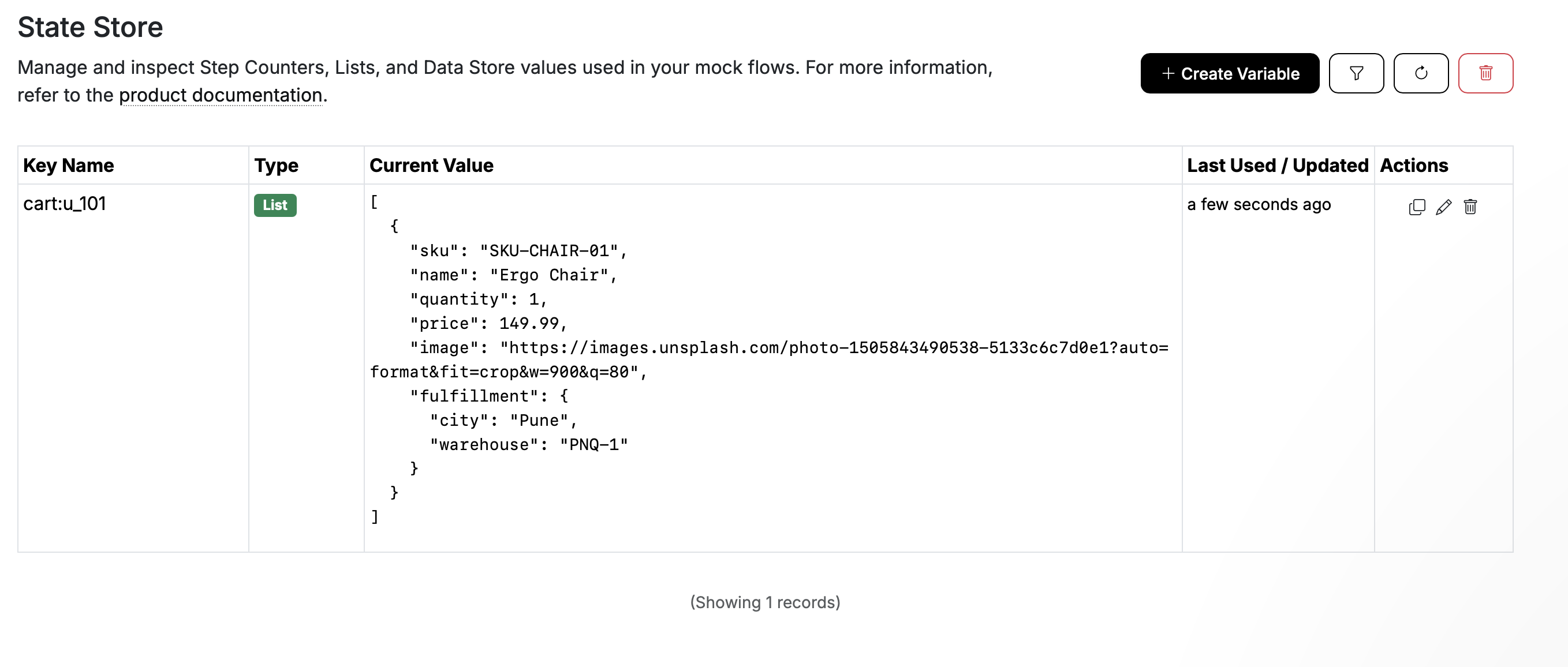
The same expression produces a different key for each JWT user. That is what keeps Maya's cart separate from another customer's cart while both use POST /cart/items.
Complete the rule with this response:
{{list 'push' (concat 'cart:' (jwtPayload (header 'authorization') 'user_id')) (body 'item')}}
{
  "message": "Item added",
  "user_id": "{{jwtPayload (header 'authorization') 'user_id'}}",
  "request_id": "{{header 'x-request-id' 'missing'}}",
  "added_sku": "{{body 'item.sku'}}",
  "added_item": {{{json (body 'item')}}},
  "cart_size": {{list 'size' (concat 'cart:' (jwtPayload (header 'authorization') 'user_id'))}},
  "cart": {{{json (list 'get' (concat 'cart:' (jwtPayload (header 'authorization') 'user_id')))}}}
}
Notice how the output format determines the brace style:
{{body 'item.sku'}}uses double braces because the SKU is text inside JSON quotes.{{{json (body 'item')}}}uses triple braces andjsonbecause the item must remain an object.{{{json (list 'get' ... )}}}does the same for the entire cart array.{{list 'size' ...}}is unquoted because the response expects a JSON number.
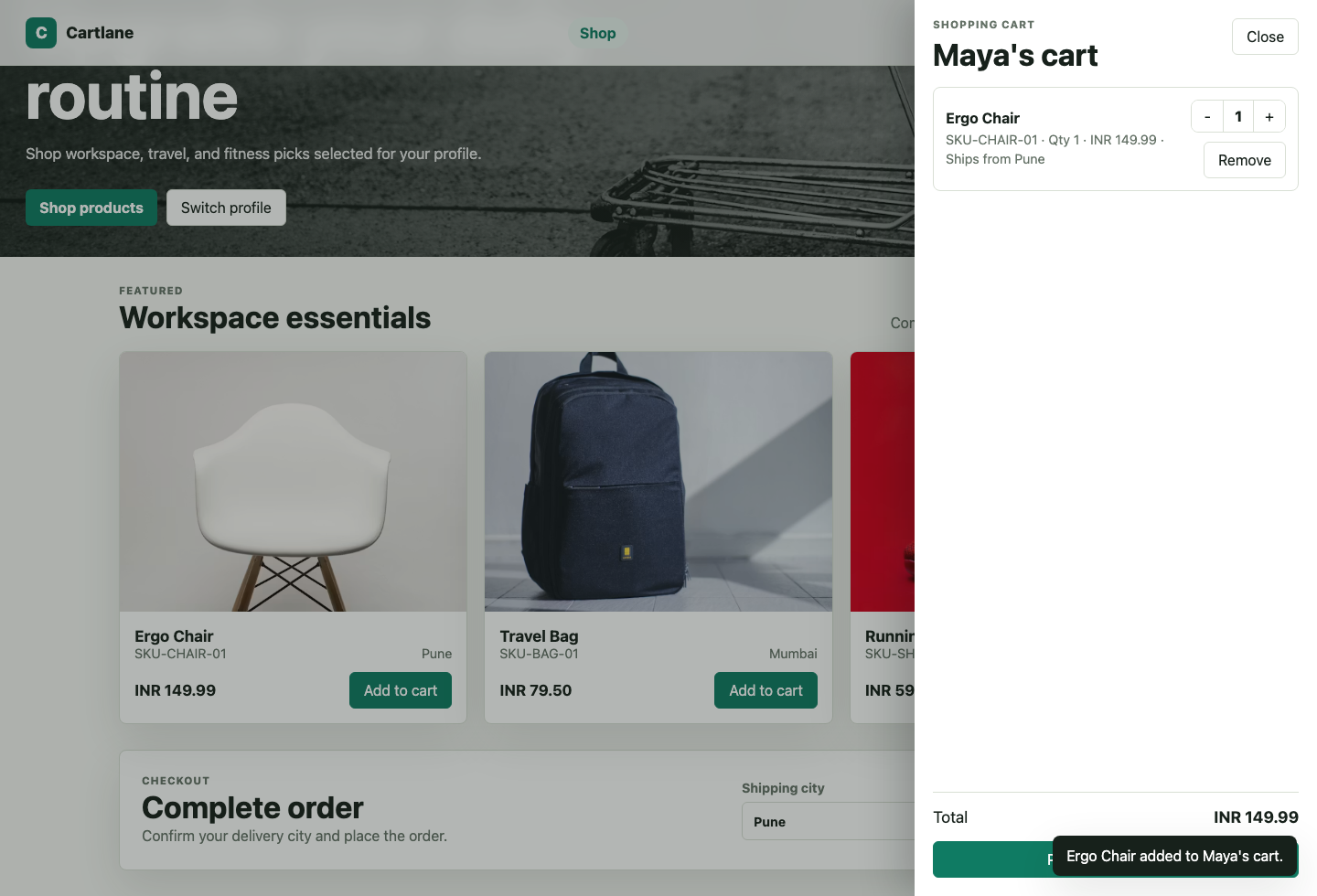
The stored cart is returned to the storefront after an item is added.
You can inspect the user-specific lists from Beeceptor's stateful data interface. Keys such as cart:u_101 make it easy to see how each JWT user receives an independent cart.
Step 3 - Retrieve the Saved Cart
Create a GET /cart rule. The storefront can request /cart?currency=USD&includeDebug=true, allowing this step to demonstrate both query parameters and persisted state:
{
  "user_id": "{{jwtPayload (header 'authorization') 'user_id'}}",
  "currency": "{{queryParam 'currency' 'USD'}}",
  "include_debug": "{{queryParam 'includeDebug' 'false'}}",
  "cart_size": {{list 'size' (concat 'cart:' (jwtPayload (header 'authorization') 'user_id'))}},
  "items": {{{json (list 'get' (concat 'cart:' (jwtPayload (header 'authorization') 'user_id')))}}},
  "jwt_payload": {{{json (jwtPayload (header 'authorization'))}}}
}
queryParam accepts a fallback as its second argument. The response uses USD when currency is absent and false when includeDebug is absent. The list 'get' call uses the same JWT-derived key created while adding an item, then json serializes the stored list as a response array.
Step 4 - Handle a Root-Level JSON Array
Not every API receives an object. Bulk operations often send a JSON array directly as the request body. Beeceptor supports both index-based access and dynamic transformations; see Handling Arrays with Template Engine for additional array patterns.
[
  {
    "sku": "SKU-CHAIR-01",
    "name": "Ergo Chair"
  },
  {
    "sku": "SKU-BAG-01",
    "name": "Travel Bag",
    "fulfillment": {
      "city": "Seattle",
      "country": "United States"
    }
  }
]
Instead of object paths such as item.sku, use the array index as the first path segment. Create a POST /cart/items/preview-bulk rule with this response:
{
  "user_id": "{{jwtPayload (header 'authorization') 'user_id'}}",
  "first_sku": "{{body '0.sku'}}",
  "second_name": "{{body '1.name'}}",
  "second_fulfillment_city": "{{body '1.fulfillment.city'}}",
  "second_item": {{{json (body '1')}}},
  "second_fulfillment": {{{json (body '1.fulfillment')}}},
  "request_body": {{{body}}}
}
Each expression follows the shape of the incoming array:
{{body '0.sku'}}reads the first product's SKU.{{body '1.name'}}reads the second product's name.{{body '1.fulfillment.city'}}reaches a nested field inside the second product.{{{json (body '1')}}}returns the entire second product as a JSON object.{{{json (body '1.fulfillment')}}}returns the nested fulfillment object.{{{body}}}reuses the complete request body when it is already valid raw JSON.
The object expressions use json because they return structured values. Primitive fields such as sku, name, and city can be inserted as text with double braces.
Step 5 - Update an Item's Quantity
When the customer changes a quantity, the storefront sends a request such as:
PATCH /cart/items/0
The request body contains the updated item:
{
  "item": {
    "sku": "SKU-CHAIR-01",
    "name": "Ergo Chair",
    "quantity": 2,
    "price": 149.99,
    "fulfillment": {
      "city": "Austin",
      "warehouse": "AUS-1"
    }
  }
}
Create a PATCH /cart/items/:index rule using a path-template condition, then use pathParam 'index' in the response template:
{{list 'update' (concat 'cart:' (jwtPayload (header 'authorization') 'user_id')) (add (pathParam 'index') 0) (body 'item')}}
{
  "message": "Cart item updated",
  "user_id": "{{jwtPayload (header 'authorization') 'user_id'}}",
  "updated_index": {{pathParam 'index'}},
  "updated_item": {{{json (body 'item')}}},
  "cart": {{{json (list 'get' (concat 'cart:' (jwtPayload (header 'authorization') 'user_id')))}}}
}
pathParam 'index' reads 0 from the URL as a string. The list update operation currently requires a numeric index, so (add (pathParam 'index') 0) converts that numeric string to a number before passing it to list 'update'.
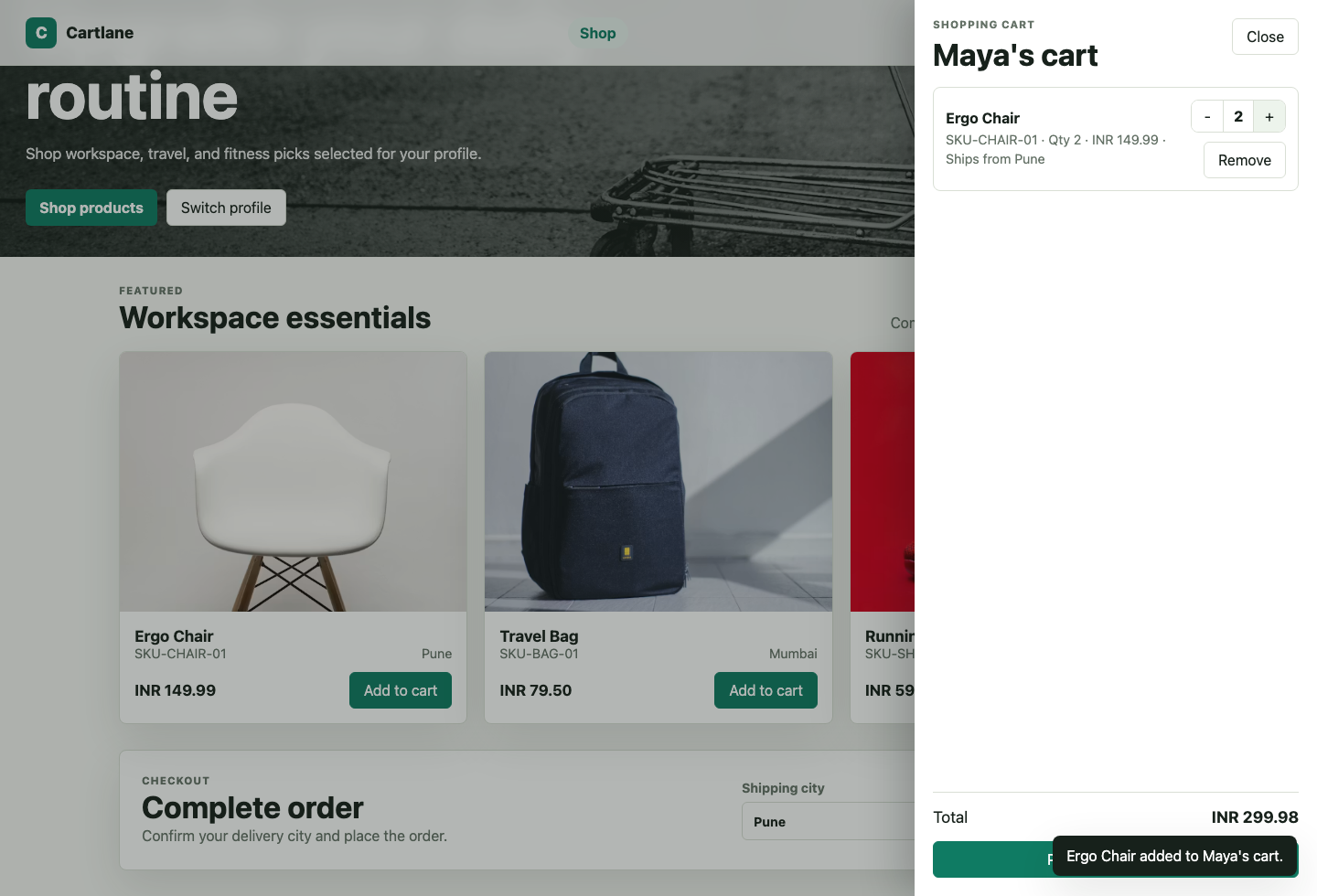
The path parameter identifies which stored item the quantity control updates.
Step 6 - Complete Checkout and Clear the Cart
The checkout request includes a client header and a nested JSON body:
POST /checkout
X-Client: web-demo
{
  "payment": {
    "method": "card",
    "last4": "4242"
  },
  "shipping_address": {
    "line1": "500 Congress Avenue",
    "city": "Austin",
    "country": "United States"
  }
}
Create a POST /checkout rule with the following response template:
{{step-counter 'inc' (concat 'order:' (jwtPayload (header 'authorization') 'user_id')) 1}}
{
  "order_id": "ORD-{{jwtPayload (header 'authorization') 'user_id'}}-{{step-counter 'get' (concat 'order:' (jwtPayload (header 'authorization') 'user_id'))}}",
  "status": "confirmed",
  "user_id": "{{jwtPayload (header 'authorization') 'user_id'}}",
  "client": "{{header 'x-client' 'unknown'}}",
  "payment": {{{json (body 'payment')}}},
  "shipping_city": "{{body 'shipping_address.city'}}",
  "shipping_address": {{{json (body 'shipping_address')}}},
  "items": {{{json (list 'get' (concat 'cart:' (jwtPayload (header 'authorization') 'user_id')))}}},
  "cart_cleared": true
{{list 'reset' (concat 'cart:' (jwtPayload (header 'authorization') 'user_id'))}}
}
This final rule combines the patterns used throughout the tutorial:
header 'x-client' 'unknown'reads a request header with a fallback.body 'shipping_address.city'reads a nested primitive.json (body 'shipping_address')serializes a nested object.step-countercreates a per-user order sequence.list 'get'returns the user's current cart in the order response.list 'reset'clears only that user's cart after checkout.
Common Formatting Mistakes
Returning an Object Inside Quotes
An object helper placed inside quotes becomes text rather than a JSON object:
{
  "item": "{{body 'item'}}"
}
Serialize the object and insert it without escaping:
{
  "item": {{{json (body 'item')}}}
}
Omitting json for Structured Data
Objects and arrays should pass through json before being embedded in a response:
{
  "fulfillment": {{{json (body '1.fulfillment')}}},
  "cart": {{{json (list 'get' (concat 'cart:' (jwtPayload (header 'authorization') 'user_id')))}}}
}
Quoting Numbers and Booleans
Values placed inside quotes become JSON strings. Leave numeric or boolean expressions unquoted when the client expects their native types:
{
  "cart_size": {{list 'size' (concat 'cart:' (jwtPayload (header 'authorization') 'user_id'))}},
  "available": true
}
Let's Test
Replace shopping-cart with your Beeceptor endpoint name:
BASE_URL="https://shopping-cart.proxy.beeceptor.com"
First, log in:
curl -X POST "$BASE_URL/auth/login" \
  -H "Content-Type: application/json" \
  -d '{"user_id":"u_101","name":"Maya Wilson","email":"maya@example.com"}'
Copy the returned token and use it to add an item:
curl -X POST "$BASE_URL/cart/items" \
  -H "Authorization: Bearer <access_token>" \
  -H "Content-Type: application/json" \
  -d '{"item":{"sku":"SKU-CHAIR-01","name":"Ergo Chair","quantity":1,"price":149.99,"fulfillment":{"city":"Austin","warehouse":"AUS-1"}}}'
Retrieve the saved cart and read query parameters:
curl "$BASE_URL/cart?currency=USD&includeDebug=true" \
  -H "Authorization: Bearer <access_token>"
Update the first item's quantity:
curl -X PATCH "$BASE_URL/cart/items/0" \
  -H "Authorization: Bearer <access_token>" \
  -H "Content-Type: application/json" \
  -d '{"item":{"sku":"SKU-CHAIR-01","name":"Ergo Chair","quantity":2,"price":149.99,"fulfillment":{"city":"Austin","warehouse":"AUS-1"}}}'
Finally, check out and clear the user's cart:
curl -X POST "$BASE_URL/checkout" \
  -H "Authorization: Bearer <access_token>" \
  -H "X-Client: web-demo" \
  -H "Content-Type: application/json" \
  -d '{"payment":{"method":"card","last4":"4242"},"shipping_address":{"line1":"500 Congress Avenue","city":"Austin","country":"United States"}}'
Recap
You built a stateful shopping cart virtual API that reads request data and formats valid JSON responses. Along the way, you learned to:
- Read primitive and nested fields with
body. - Access root-level array elements by numeric path segments.
- Read headers, query parameters, path parameters, and JWT claims.
- Use
{{...}}for text and unquoted primitive expressions. - Use
{{{...}}}withjsonfor objects and arrays. - Derive user-specific state keys from JWT claims.
- Persist, retrieve, update, and reset cart data with stateful helpers.
These patterns let a Beeceptor virtual API preserve context and respond like a real backend while the production service is still being designed, built, or tested.