Simulate Gemini Errors
When integrating Google’s Gemini APIs into your tech stack, failures are inevitable. They are part of standard operations with these large language models. Gemini, being one of them, these models are shared resources when available as cloud API. They are heavily rate limited, and sensitive to burst traffic. Even if you have architected your stack good enough, you can hit 429 Too Many Requests anytime during parallel requests, CI test runs, critical demos, or background batch jobs.
From a QA and testing perspective, these errors create an inherent problem. For example, rate limiting is hard to reproduce on demand. You cannot reliably hit real Gemini quotas without burning your wallet or incurring costs, slowing your team down, or waiting for traffic spikes to happen some day. The others, such as retry logic, backoff timing, and user facing error handling, are exactly the parts that need the most testing if you want a robust product where customers don't complain after the release. As a QA, it's your responsibility. You need a way to force these failures to be predictable, repeatable, and without depending on Google’s infrastructure behavior.
Solution
The recommended solution is to stop treating Gemini as a black box during testing. You place a controllable proxy in front of the Gemini API, you can inject realistic failures such as rate limiting, quota exhaustion, and temporary unavailability. Instead of hoping Google's Gemini fails at the right moment, you decide when it fails and validate how your system behaves under stress.
You get better handle to your test scenario.
Let's start.
What You Are Building
Before jumping into steps, let's understand the configuration and setup.
You will create a Beeceptor mock server (HTTP endpoint) that acts as an HTTP proxy between your application and Google’s Gemini API. Under normal conditions, Beeceptor forwards requests to Gemini untouched. When a request matches a mocking rule, Beeceptor short circuits the request and returns a predefined response, such as a 429.
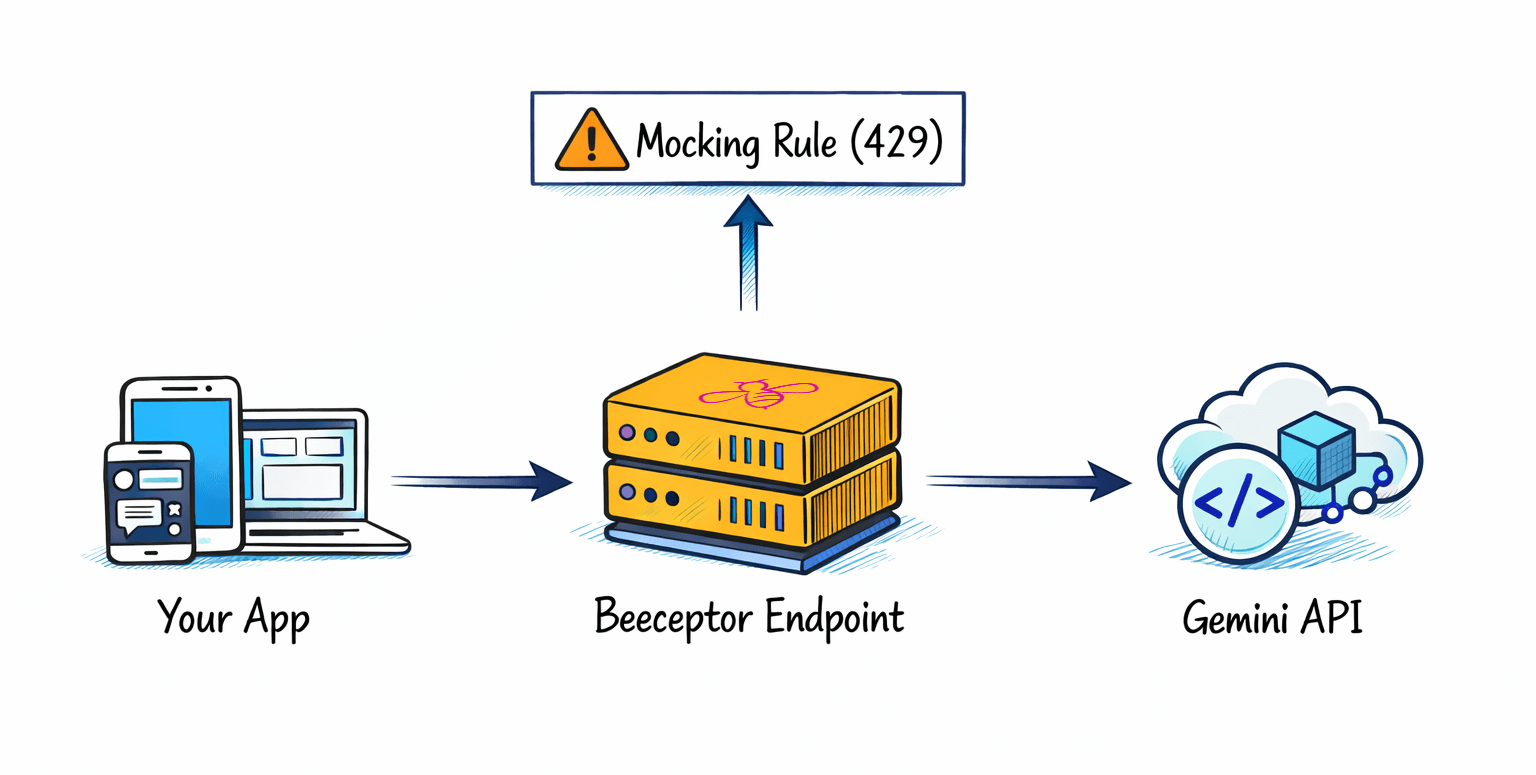
This setup lets you test real SDKs, real HTTP clients, and real request payloads, while fully controlling failure behavior.
Prerequisites
This tutorial assumes you already work with APIs and automated testing.
You will need:
- A Beeceptor account
- A Google Gemini API key
- Basic understanding of HTTP status codes
- Node.js or Python if you want to run the examples
You do not need any change in your Gemini project or Google Cloud quota settings, or application code. A small configration change needed where we rewire the Google Gemini APIs's base URL.
Step 1: Create a Beeceptor Endpoint
The endpoint is the foundation of your test setup. It provides a stable base URL that your application will call instead of Google directly.
- Open Beeceptor and login to your account.
- From the homepage, create a new mock server by giving a descriptive name, for example
gemini-rate-limit-test. - Click Create Mock Server.
Beeceptor assigns a unique subdomain such as:
https://gemini-rate-limit-test.free.beeceptor.com
From a QA perspective, this endpoint becomes part of your test environment. You can reuse it across local development, CI pipelines, and staging tests.
Step 2: Configure Global Proxy to Gemini API
By default, Beeceptor does nothing until you tell it where to forward requests. The global proxy ensures all unmatched requests behave exactly like real Gemini calls, and they are forwarded to original server.
- Open your endpoint dashboard
- Open the Proxy Setup popup
- Set Target URL to:
https://generativelanguage.googleapis.com - Save the configuration
At this stage, Beeceptor behaves like a transparent pass through proxy. Every request is forwarded to Gemini, and every response comes back unchanged. In between, Beeceptor intercepts these calls and gives you an opportunity to mock. This makes it safe to enable the proxy early without breaking existing functionality.
Step 3: Application Under Test - Code Examples
Node.js Example
This example defaults to Google’s Gemini API and only uses Beeceptor when explicitly overridden. This is the recommended setup for QA and CI pipelines, and can be configured with just a small code change.
Code Example
const { GoogleGenAI } = require("@google/genai");
const API_KEY = process.env.GEMINI_API_KEY;

// Default to Google's real Gemini API
const GEMINI_BASE_URL =
  process.env.GEMINI_BASE_URL ||
  "https://generativelanguage.googleapis.com";

const genAI = new GoogleGenAI({
  apiKey: API_KEY,
  httpOptions: {
    baseUrl: GEMINI_BASE_URL
  }
});

async function test429Error() {
  try {
    console.log("Calling Gemini API...");
    console.log("Base URL:", GEMINI_BASE_URL);

    const result = await genAI.models.generateContent({
      model: "gemini-2.0-flash",
      contents: "Hello, this is a test",
      config: {
        temperature: 0.7,
        maxOutputTokens: 100
      }
    });

    console.log("Unexpected success");
    console.log(result.text);
  } catch (error) {
    console.log("Error caught");
    console.log("Message:", error.message);

    if (error.status === 429 || error.code === 429) {
      console.log("✓ 429 rate limit simulation successful");
    }
  }
}

test429Error();
Running Against Beeceptor
export GEMINI_API_KEY=your_key_here
export GEMINI_BASE_URL=https://<your-endpoint>.free.beeceptor.com
node app.js
This switch is exactly what QA teams want. Same binary, same code, different behavior.
Python Example
The Python example follows the same pattern. The only thing that changes is the environment variable.
import os
import requests

API_KEY = os.environ.get("GEMINI_API_KEY")

# Default to Google's Gemini API
GEMINI_BASE_URL = os.environ.get(
    "GEMINI_BASE_URL",
    "https://generativelanguage.googleapis.com"
)

url = f"{GEMINI_BASE_URL}/v1beta/models/gemini-2.0-flash:generateContent"
params = {"key": API_KEY}
headers = {"Content-Type": "application/json"}
payload = {
    "contents": [{
        "parts": [{
            "text": "Hello, this is a test"
        }]
    }]
}

print("Calling Gemini API")
print("Base URL:", GEMINI_BASE_URL)

response = requests.post(
    url,
    params=params,
    headers=headers,
    json=payload
)

print("Status Code:", response.status_code)
print("Response:", response.json())

if response.status_code == 429:
    print("✓ 429 rate limit simulation successful")
Run With Beeceptor Proxy
export GEMINI_API_KEY=your_key_here
export GEMINI_BASE_URL=https://<your-endpoint>.free.beeceptor.com
python app.py
At this point, with your app is running through Beeceptor, all requests to the Gemini API show up in the Beeceptor dashboard. You can inspect each call in real-time as they trigger. Now that the traffic is flowing through Beeceptor, you have a log of exactly what your app is doing. The next step is to either replay these recorded requests or use Beeceptor to simulate custom responses for testing purposes.
Step 4: Create a Mocking Rule for 429 Errors
This step introduces controlled failure. You will intercept a specific Gemini endpoint and force a rate limit response. Rule Matching Configuration
- Click Mocking Rules to open list of behaviors.
- Click Create New Rule
- Set the matching conditions:
- HTTP Method:
POST - Request Path Starts With:
/v1beta/models/gemini-2.0-flash:generateContent
- HTTP Method:
- Response Configuration: In the response section,
- Status Code: 429
- Response Body:
{
  "error": {
    "code": 429,
    "message": "Resource exhausted. Please try again later. Please refer to https://cloud.google.com/vertex-ai/generative-ai/docs/error-code-429 for more details.",
    "status": "RESOURCE_EXHAUSTED"
  }
}
- Save the rule.
From this point on, Beeceptor blocks matching requests before they reach Gemini. This simulates quota exhaustion, model overuse, and rate limiting without touching Google’s infrastructure. This precision matters in QA to have better control.
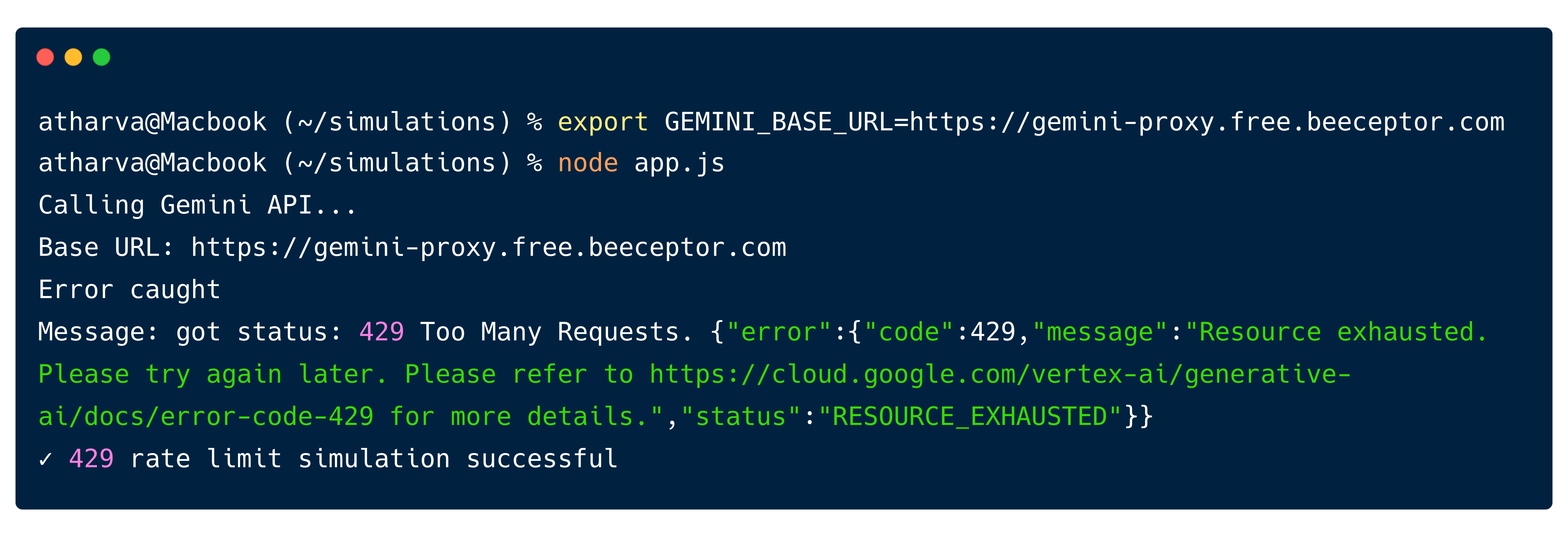
Now let's set the GEMINI_BASE_URL environment variable and run this Node.js script:
export GEMINI_BASE_URL=https://gemini-proxy.free.beeceptor.com
node app.js
Output:
Conclusion
You now have a controlled and repeatable way to test how your application behaves when Gemini service fails. Instead of waiting for real quota exhaustion or unpredictable traffic spikes, you can force 429 responses on demand and observe what your system actually does. This boasts QA's confidence in the release.
The key takeaway is that Gemini instability is not hypothetical. Rate limits, model overuse, and temporary failures are part of normal operation. Using proxy from Beeceptor, you gain full ability to simulate these these scenarios using your real client code, real SDKs, and real network behavior.
From here, you can go deeper and make your tests closer to production reality. Some concrete next steps you should try:
- Use weighted responses to return 200 most of the time and 429 occasionally, then verify retry behavior over multiple calls.
- Add a response delay to simulate slow Gemini responses and test client side timeouts.
- Create separate rules per model to simulate one model being rate limited while others continue to work.
- Use stateful counters to return 429 only after N successful requests, mimicking quota exhaustion.
- Simulate other Gemini failures like 500, 503, or malformed responses to test defensive parsing.