We ship fast!

We hold ourselves to the same standard we build Beeceptor for: remove blockers, move faster, and keep improving the system underneath. We ship continuously, with meaningful product updates landing every week.
This page highlights the major releases. Behind them is a steady stream of fixes, performance work, reliability improvements, and infrastructure upgrades that make Beeceptor stronger as your usage grows.
Got a feature request?Share it.
If it removes real friction, it gets our attention.
Your CSV, Now a Live REST API
Turn a spreadsheet into a working API without building a backend or signing up. Upload a CSV, preview your data, choose an API path and record identifier, and get a hosted URL ready to use.
Your API does more than return JSON: use standard HTTP requests to create, read, update, and delete records. Start with a product catalog, customer list, or test fixture and connect it to your frontend, prototype, or integration test.
Your API does more than return JSON: use standard HTTP requests to create, read, update, and delete records. Start with a product catalog, customer list, or test fixture and connect it to your frontend, prototype, or integration test.
Fill Your CRUD API with Data in One Import
Bring your own test data to an existing CRUD API without creating records one by one. In the CRUD data editor, upload a CSV or JSON file, or paste your data directly. Import a CSV with column headers, a JSON array for multiple records, or a single JSON object.
Seed a product catalog, customer directory, or test fixture and start exercising your API with realistic data. Once imported, records can be managed in the editor or through your CRUD routes.
Seed a product catalog, customer directory, or test fixture and start exercising your API with realistic data. Once imported, records can be managed in the editor or through your CRUD routes.
Beeceptor Is Now Closer to Australia and New Zealand
Beeceptor now has an Australia (AU) instance to reduce network latency for users in Australia and New Zealand. Get the same set of features, hosted closer to you, for more responsive API mocking and testing.
To use the AU instance, open Beeceptor’s login page and choose Australia from the region dropdown before signing in. Watch the video below to see how to switch regions.
To use the AU instance, open Beeceptor’s login page and choose Australia from the region dropdown before signing in. Watch the video below to see how to switch regions.
Model More API Behaviors with Fewer Mock Rules
Beeceptor’s response templates now include
objectMerge: reuse a record, customize the scenario
Merge two or more objects into one response. Fields in later objects override earlier ones, and the original objects stay unchanged.
For example, attach a
coalesce: choose a value with a fallback
Return the first value that is neither null nor undefined. Valid values such as
For a
Model an order moving from pending to shipped, customer-specific pricing, or optional fields without multiplying mock rules. You can keep distinct rules for different matching conditions, and let your templates handle variations in the data.
objectMerge and coalesce, giving you more control over how reusable test data becomes an API response. Combine them with Data Store and Datasets to model customer-specific responses, changing workflow states, and fallback behavior within a mock rule. You can cover more scenarios without copying a rule for every customer or test case.objectMerge: reuse a record, customize the scenario
Merge two or more objects into one response. Fields in later objects override earlier ones, and the original objects stay unchanged.
For example, attach a
customers Dataset containing a record with id set to c-101. The following template looks up the requested customer, keeps their existing fields, and adds a premium-support scenario:{{dataset-one "customer" "customers" id=(queryParam "id")}}
{{{json (objectMerge variables.customer (object tier="premium" prioritySupport=true))}}}
?id=c-101. The same rule can enrich other matching customer records without duplicating their data in response templates.coalesce: choose a value with a fallback
Return the first value that is neither null nor undefined. Valid values such as
0, false, and an empty string are preserved.For a
products Dataset with a numeric discount field, this template uses a Data Store override first, the matching product’s discount second, and 10 as the default:{{dataset-one "product" "products" id=(queryParam "id")}}
{
"discount": {{coalesce (data-store "get" "discount") variables.product.discount 10}}
}
Model an order moving from pending to shipped, customer-specific pricing, or optional fields without multiplying mock rules. You can keep distinct rules for different matching conditions, and let your templates handle variations in the data.
Route Requests to Any API Base Path
Connect your Beeceptor endpoint to APIs hosted under paths such as
For example, set your target to
Use it to switch between upstream environments with different base paths while keeping your client setup and mock rules consistent. Configure it in your endpoint’s Routing settings.
/payments without rewriting the URLs your application calls. The new Path Prefix setting adds a base path when Beeceptor forwards unmatched requests to your upstream API.For example, set your target to
https://api.acme.com and your path prefix to /payments. A request to /orders/123 on your Beeceptor endpoint forwards to https://api.acme.com/payments/orders/123, keeping its query parameters intact.Use it to switch between upstream environments with different base paths while keeping your client setup and mock rules consistent. Configure it in your endpoint’s Routing settings.
Live Traffic Insights for Performance Testing
See how traffic reaches your endpoint while a performance test runs. Available on the Scale plan through your endpoint’s Stats page, Live traffic gives you quick visibility into requests per second so you can spot traffic spikes and check whether your test is generating the expected load.
Choose a time range to see total requests, average RPS, and peak RPS calculated for that period. Drag across the chart to zoom into a specific interval and recalculate its summary, making it easier to inspect a burst or compare phases of a test. Pause updates to review the chart, then resume or reset zoom to return to live monitoring.
Choose a time range to see total requests, average RPS, and peak RPS calculated for that period. Drag across the chart to zoom into a specific interval and recalculate its summary, making it easier to inspect a burst or compare phases of a test. Pause updates to review the chart, then resume or reset zoom to return to live monitoring.
Shared Test Data
Your test data no longer needs to live inside every mock rule. With Datasets, you can import JSON, NDJSON, or CSV records once and use them in mock responses. Use incoming query parameters to look up records and build dynamic responses. You can share the same dataset across authorized endpoints in your organization and refresh records independently without rewriting rules.
Put it to work:
Put it to work:
- Keep test data centrally managed.
- Build realistic responses by combining dataset lookups with other template helpers.
Simulate High Latency Under Load
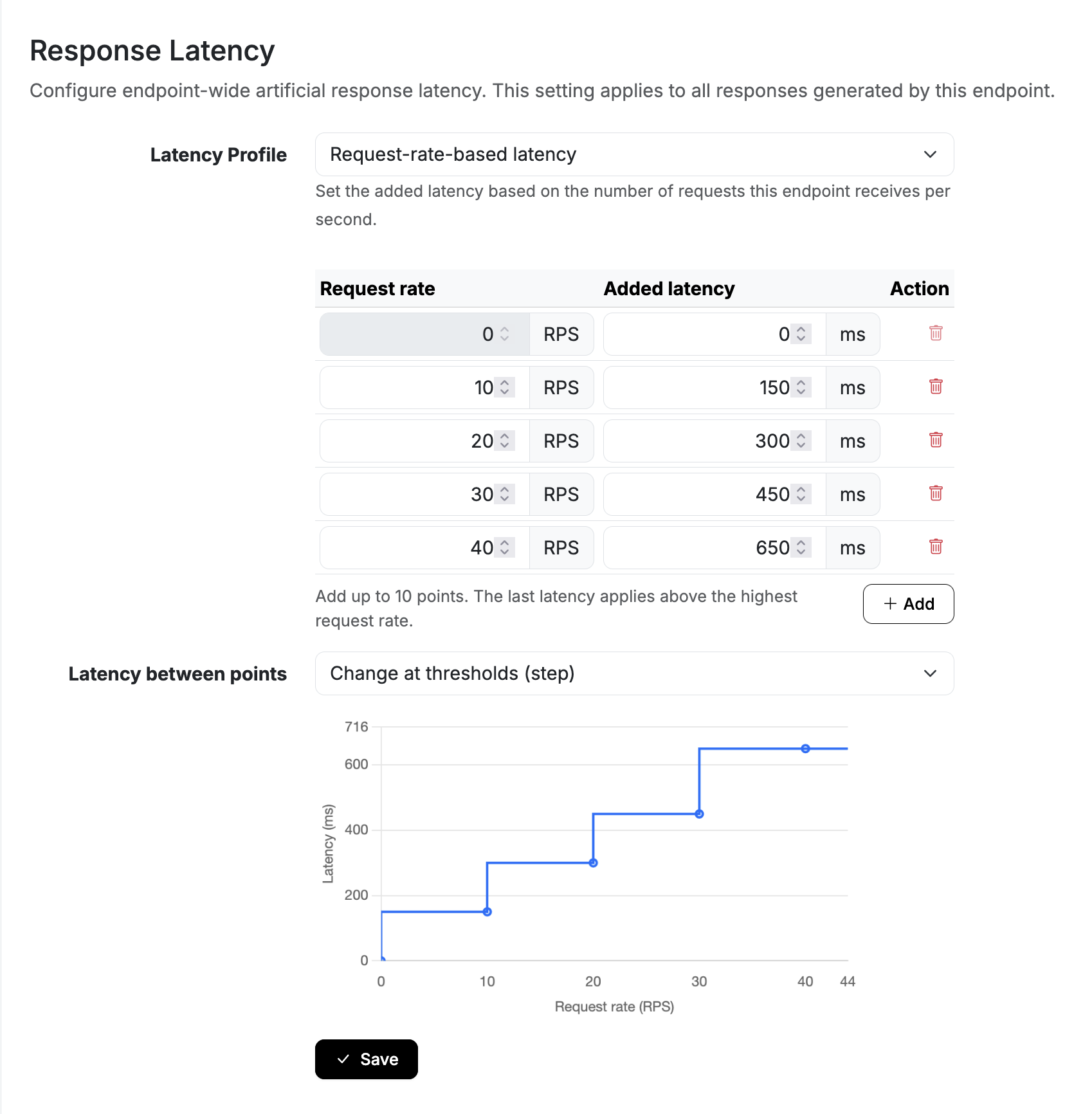
An external dependency that feels fast in development can become your bottleneck at peak traffic. With Request Rate Based latency, you can define how much delay Beeceptor should add at different request rates. Choose gradual increases or jumps at thresholds. Your performance test supplies the traffic; Beeceptor adjusts the delay as the measured rate changes.
Put it to work:
Put it to work:
- Simulate a payment provider slowing down during a flash sale.
- Check whether retries amplify traffic and make a slowdown worse.
- Exercise timeouts, circuit breakers, and fallback flows as load climbs.
- Compare application changes against the same configured dependency latency curve.
Query Parameter Filtering for Requests
Filtering requests by query parameters is now even easier. You can now directly combine query parameter filters with path, method, and header conditions to precisely target incoming requests and simulate behaviors. While Beeceptor has long supported query parameter filtering, this fully integrated support streamlines the process, making it much faster to debug and fine-tune your API simulations. Check out the quick demo to see how it works in action.
Promote Configurations Across Environments
Beeceptor now makes it easy to promote a proven configuration from one endpoint to another with Pull Snapshot. You can copy a restorable snapshot directly into the endpoint (asset or mock-server) you are working on, reducing manual setup, avoiding configuration drift, and having a controlled promotion process across environments.
Common use cases:
Common use cases:
- Promote tested configurations from development to QA or staging.
- Standardize mock rules and endpoint settings across team environments.
- Share your setup with your team for approved configurations.