We ship fast!

When we help remove your blockers, we hold ourselves to the same standard. We ship continuously, with new features and improvements rolling out every week.
This page highlights major releases. Along the way, we also push regular fixes, stability improvements, and infrastructure upgrades to keep everything running smoothly for you.
Got a feature request?Share it.
If it removes friction, we ship it.
OpenAPI Specs: Override AI-Generated API Responses
Our OpenAPI-to-Mock capability already lets you go from an API specification to a live mock server in under a minute. You upload an OpenAPI spec and instantly see your API come to life with realistic, contextual responses. Instead of static placeholders, Beeceptor automatically generates meaningful test data - product names, people names, ages, street addresses, SSN/Aadhaar numbers, and more - using AI and 300+ built-in data generators. You get a mock API that looks and behaves much closer to a real production system.
Now we’re taking this a step further with custom response overrides.
While Beeceptor can automatically generate contextual responses, you can now override and customize any part of the generated response/field to match your exact testing needs. Want specific product names, controlled user profiles, or predictable IDs for integration tests? You’re in full control.
How: Switch to your endpoint settings and open Customize Test Data under the specification section.
No coding. No infrastructure. No deployments.
Just upload OpenAPI spec and start building.
Now we’re taking this a step further with custom response overrides.
While Beeceptor can automatically generate contextual responses, you can now override and customize any part of the generated response/field to match your exact testing needs. Want specific product names, controlled user profiles, or predictable IDs for integration tests? You’re in full control.
How: Switch to your endpoint settings and open Customize Test Data under the specification section.
No coding. No infrastructure. No deployments.
Just upload OpenAPI spec and start building.
Response Building: Fix errors with AI
If you run into syntax errors while building a dynamic response template for your mock rule, Fix with AI is here to help. Available directly from the error notification, it intelligently corrects the issue inline. Whether you’re working with JSON or XML, it focuses only on the relevant syntax errors, so you don’t have to spend time debugging formatting details.
You can stay focused, designing your mock APIs. It’s fast, context-aware, and built to save you time. Give it a try today
View Who’s Editing Mock Rules
Beeceptor now shows in real time who is actively editing a mock rule, so you always know what’s happening before making changes. If someone is working on a rule, now you can see it immediately, helping you avoid accidental overwrites and confusion. You can now confidently keep building and refining mocks without second guessing who’s editing what.
Easier 2FA Code Generation for Testing
We’ve made it much easier to bring your 2FA codes into Beeceptor. You can now simply drag-n-drop or paste image files, or even scan a QR code directly using your device camera if your QA code is on another device, making the experience faster and more seamless for sandbox and test authentication.
You can also generate a persistent link to retrieve future codes whenever you need them, so you don’t have to repeat the setup every time.
You can also generate a persistent link to retrieve future codes whenever you need them, so you don’t have to repeat the setup every time.
New UI Experience for Beeceptor
We’ve shipped brand-new user interface for Beeceptor! All the existing features remain the same, now presented in a cleaner and more intuitive design. The updated UI offers better contrast, and improved readability, making it easier to find what you need and work faster.
Alongside the visual update, we’ve rewritten the Rules Engine behind the scenes to deliver better performance and reliability.
This upgrade not just makes Beeceptor faster, easier to use, and eliable, but also helps us ship new features faster in the future. All these, without impacting your existing integrations.
Alongside the visual update, we’ve rewritten the Rules Engine behind the scenes to deliver better performance and reliability.
This upgrade not just makes Beeceptor faster, easier to use, and eliable, but also helps us ship new features faster in the future. All these, without impacting your existing integrations.
A Big Upgrade to How You Manage Rules
Managing more than ten rules is now smoother with an upgraded, stable interface.
- Search instantly across request path, rule ID, request body, and more for accurate filtering.
- Search results show high-quality matches and hide irrelevant ones.
- New or updated rules auto scroll into view with a highlight so you never lose track.
- Jump from request history directly to the matching rule with a single click.
- Reorder rule priority easily by dragging the leftmost icon.
Localized Test Data Generation
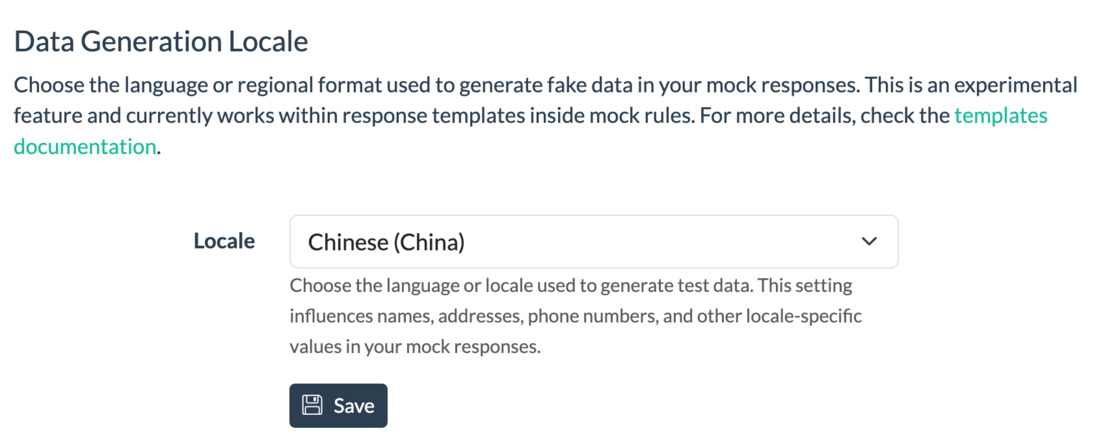
Beeceptor now supports localized test data for mock responses, enabling you for region-accurate demos.
You can set a preferred locale per endpoint, and Beeceptor will generate names, addresses, phone numbers, dates, and more based on that region. The synthetic data generation is supported in Portuguese, Spanish, English, French, Indonesian, or Chinese languages.
You can set a preferred locale per endpoint, and Beeceptor will generate names, addresses, phone numbers, dates, and more based on that region. The synthetic data generation is supported in Portuguese, Spanish, English, French, Indonesian, or Chinese languages.